
Electric Outage Information
Active Power Outages & Alerts
FLORISTON FIRE UPDATE, 9/17, 12:30pm: TDPUD continues to monitor the Floriston Fire and remains in contact with NV Energy to track the possibility of emergency de-energization of the transmission lines that serve electricity to Truckee. Based on current fire containment efforts and the direction of spread, power outages for TDPUD’s territory are not expected. But this could change based on today’s winds and fire behaviors.
ACTUALIZACIÓN DEL INCENDIO FLORISTON, 17 DE SEPTIEMBRE, 12:30 pm: TDPUD continúa monitoreando el incendio Floriston y se mantiene en contacto con NV Energy para evaluar la posibilidad de una desenergización de emergencia de las líneas de transmisión que suministran electricidad a Truckee. Según los esfuerzos actuales de contención y la dirección en la que se propaga el incendio, no se anticipan cortes de energía en el territorio de TDPUD. Sin embargo, esto podría cambiar según los vientos y el comportamiento del incendio durante el día de hoy.
________________________________________________
FLORISTON FIRE - POTENTIAL POWER IMPACT, 9/16, 12pm: TDPUD is monitoring the Floriston Fire and its potential impact to our power service. While the fire is not currently threatening Truckee, it has the potential to threaten the NV Energy transmission lines that deliver power to our distribution system from Verdi. If NV Energy opts for an emergency de-energization of the transmission line, all TDPUD customers will lose power without advance notice. We recommend customers take precautions now to charge devices and prepare for the possibility of an outage. We will update when we have more information.
INCENDIO DE FLORISTON – POSIBLE IMPACTO EN EL SUMINISTRO ELÉCTRICO, 9/16, 12pm: TDPUD está monitoreando el incendio de Floriston y su posible impacto en nuestro servicio eléctrico. Aunque actualmente el incendio no representa una amenaza para Truckee, podría afectar las líneas de transmisión de NV Energy que suministran electricidad a nuestro sistema de distribución desde Verdi. Si NV Energy decide realizar una desenergización de emergencia de la línea de transmisión, todos los clientes de TDPUD se quedarán sin electricidad y sin previo aviso. Recomendamos que los clientes tomen precauciones desde ahora, carguen sus dispositivos y se preparen ante la posibilidad de un apagón. Publicaremos actualizaciones en cuanto tengamos más información.
Live updates can be found here during large-scale or extended outages
Click here to view the outage map in a new window
Recent Outage Recaps
Sept 12, 2026 — At about 8:30pm, we experienced an outage affecting affecting approximately 1,700 customers in Tahoe Donner. Power was restored to all customers around 11pm. The cause of the outage was animal interference.
Aug 26, 2026 — At about 12:10pm, we experienced an outage affecting approximately 1,700 customers in Tahoe Donner. At about 12:40pm, power was restored to the majority of customers. Customers on Skislope Way and Herringbone Way remained without power until about 1:15pm, while crews repair a power line.
Aug 24, 2026 — At about 2:25pm, we experienced an outage affecting approximately 2,200 customers in Sierra Meadows, Downtown Truckee, along Brockway Rd and Soaring Way. All customers had power restored by 2:40pm.
Aug 23, 2026 — At about 3:30pm, all TDPUD customers experienced a brief power outage, which was required to support NV Energy operations. All customers had power restored by 4:13pm.
Aug 22, 2026 — Shortly after 6pm, TDPUD experienced a system-wide outage caused by an NV Energy emergency de-energization of the transmission line feeding our distribution system, due to the Hawk Fire. NV Energy re-energized the tranmission line at about 10:45pm, and all TDPUD customers had power restored by 11:42pm.
Outage recaps will remain on the website for at least one week following widespread or extended outages.
Sign Up for Outage Alerts
Truckee Donner PUD has a new, automated outage management system to keep customers informed during power outages, and send real-time, customized alerts to only the customers experiencing an outage.
To sign up for outage alerts, follow these steps:
- Log on to your SmartHub account. If you don't have a Smartub account, you'll need to create one. Click here for step-by-step instructions for creating a new account.
- From the menu at the top of the page, select "Notifications" and then "Manage Notifications."
- Select "Service" from the menu, and then select the options to receive email and/or text alerts for power outages.
- Check that your contact information is up-to-date, and be sure to verify your mobile number. See the tutorial below for step-by-step instructions.


Outage Text Verification Tutorial
1. Go to tdpud.org and click “My Account” in the top right corner

2. When prompted, log in to your SmartHub account

3. Once on the homepage, click on the menu button in the top right corner
4. Under the “Notifications” tab, click “Manage Contacts”

5. If you do not have a phone number associated with your TDPUD account, click “+Add Phone Contact”
6. If you see your phone number listed, click on the green button to the right that says “Confirm Contact”

7. Click the checkboxes next to “Receive Text Messages” and “Receive Voice Calls”

8. Click the green button to the right that says “Continue”

9. Click the green button that says “Agree” to agree to the terms & conditions
10. You will receive a text with a 6-digit verification code

11. Enter the verification code in the box and click the green button that saves “Save Contact”
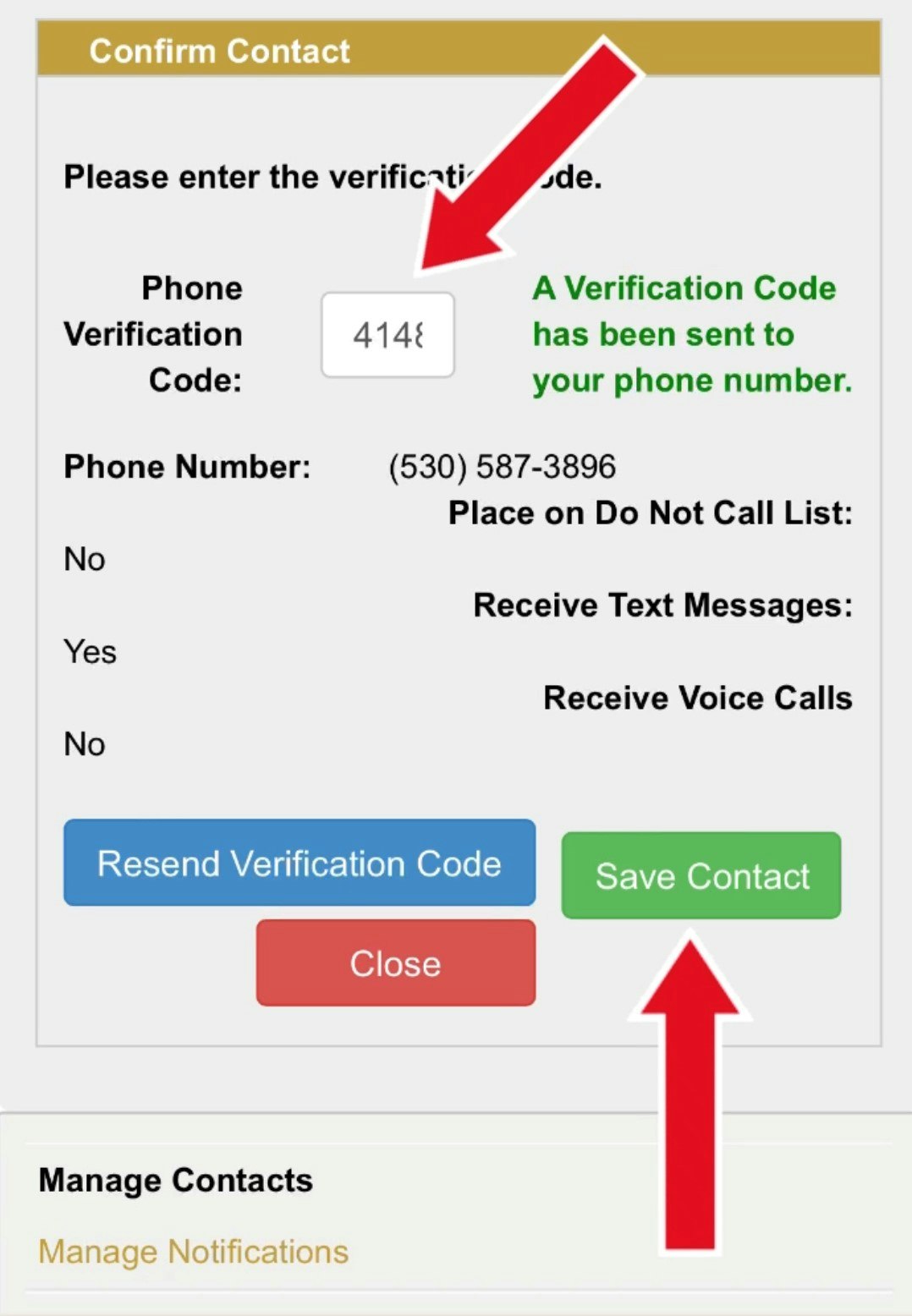
12. You will now receive outage text alerts! You will receive a confirmation text if the verification was successful, and in SmartHub it will say “Text Enrolled” next to your mobile number.

What are the causes of power outages?
Electric power outages in Truckee's mountainous environment are primarily caused by severe winter storms (wind, snow, and ice) creating faults or damaging equipment. They are occasionally caused by equipment failures in TDPUD's electric distribution system, routine maintenance, or NV Energy transmission outages. Summer outages are typically caused by thunder storms, animals, transmission, and necessary wildfire mitigation safety practices.
TDPUD is a transmission dependent utility of NV Energy. This means that power is not generated locally and TDPUD relies on NV Energy's transmission system for our electrical supply. While NV Energy's reliability is generally good, transmission outages do occur and are beyond TDPUD's control.
During winter storms, the primary causes of outages are from snow or ice shedding from trees and power lines or trees and limbs falling and making contact with electric distribution equipment. Short duration interruptions - a few seconds - are the result of TDPUD's protection equipment which can distinguish between a temporary fault (snow shedding from on onto power lines creating a temporary fault, for example) and an outage requiring field repair. In the temporary fault situation, the protection equipment automatically re-energizes the line preventing a much longer outage.
During the summer and fall months, outages are caused primarily by thunder storms, animals getting into TDPUD's electrical equipment, transmission, and changes in operations for wildfire mitigation. TDPUD wildfire mitigation safety practices increase the duration of power outages during wildfire season which extends into the summer and fall months. New California laws and regulations require that TDPUD modify operations to minimize the chance of ignition. In many cases, TDPUD is required to visually patrol all circuits in an outage to ensure that restoring power does not cause a fire. The end result is longer outages during wildfire season. See TDPUD's wildfire page for more information..
TDPUD's dedicated staff takes reliability very seriously, work hard to prevent power outages, and respond quickly when they do occur.
How do I report a power outage?
If your home or business loses power, before you report a power outage to the TDPUD you should check to ensure that TDPUD is the cause of the power outage. If you are at home, first check your circuit breakers and look outside to see if there is any damage on your property. Also check to see if your neighbors power is out or not.
If you are experiencing an electric outage, to report the outage call TDPUD at 530-587-3896.
TDPUD takes reliability and safety very seriously. We work hard to maintain our electric system and respond quickly to outages.
Outage Management System FAQ
What is OMS?
OMS stands for Outage Management System, and it is the new notification system that the TDPUD will be using to communicate with customers during a power outage.
How do I sign up for OMS?
Customers should log on to their TDPUD SmartHub Account and verify their contact information in order to receive OMS text alerts. Once in SmartHub, customers must go to “manage contacts” under the notifications tab, confirm their mobile number, click the box to receive text messages and follow the instructions to receive a 6-digit code and complete the verification. Check out the OMS text verification tutorial for step-by-step instructions with pictures.
How is OMS different than previous TDPUD outage communications?
- OMS is able to send automatic notifications when an outage is predicted, so you’ll know in almost real-time when you’re experiencing an outage.
- OMS can identify exactly which homes and businesses are being affected, which is how it only sends notifications to the customers who are experiencing the outage.
- OMS gathers information from a number of sources, and for the first time integrates all of this analysis in order to predict outages and their impacts, as well as communicate them to customers.
- At the individual account level, it gathers real-time information from the “smart meter” system we utilize to collect power information and detect interruption at each meter.
- At the infrastructure level, it gathers real-time information from the data monitoring and control system at the substations and electric feeders. This is the equipment that facilitates the delivery of power from transmission lines to local distribution lines.
- It uses our improved mapping system to trace the impacts of an outage. It can detect where an outage will originate, and then follow the model to know which homes and businesses will be impacted.
- It uses our SmartHub customer service system to log information from customer calls to our call center. It also utilizes the customer profile information in SmartHub to communicate with affected customers.
- The way these systems work together for the first time is what sets OMS so far apart and ahead from the previous outage notification systems TDPUD has used.
How can I receive OMS alerts if I am not the account holder for my residence?
OMS alerts can only be sent to the contact information associated with the utility account. If you are a resident but are not on the TDPUD account, you can visit tdpud.org/outage to find information during a power outage. You should also sign up for TDPUD Nixle emergency alerts by texting TDPUD to 333111. Text and email alerts will still be send via Nixle during an outage if it impacts a significant amount of the community.
How do I get information on outages if I am visitor and renting a home for vacation?
Visitors can visit tdpud.org/outage to find information during a power outage. They can also sign up for TDPUD Nixle emergency alerts by texting TDPUD to 333111, but alerts will only be sent via Nixle for large-scale outages.
What kinds of alerts will OMS send me?
Customers can expect email and text alerts for when an outage occurs, when a restoration time is established if available and when power is restored.
Why did I get an OMS alert when my power isn’t out?
We are rolling out this new OMS in a “beta launch.” As a new system, we know that everything might not be functioning perfectly to start, but through real-world usage and customer feedback we plan to use the next few months to make the necessary changes to optimize the system.
If you receive an outage notification when you’re not experiencing an outage, or don’t receive one when you are, please share your feedback with us by emailing service@tdpud.org.